
Cloud computing is opening up exciting career opportunities, and AWS skills can help you take your first step into this growing field. But reading about cloud services is only part of the learning process; understanding how they work in real situations is equally important. If you are looking for an AWS course in Pune, working on practical projects can help you gain confidence, improve your technical skills, and prepare for job interviews. From hosting a simple website to managing cloud data and securing applications, these 10 AWS projects offer a clear path from beginner-level tasks to advanced cloud solutions.
Top 10 AWS Projects for Beginners to Experts
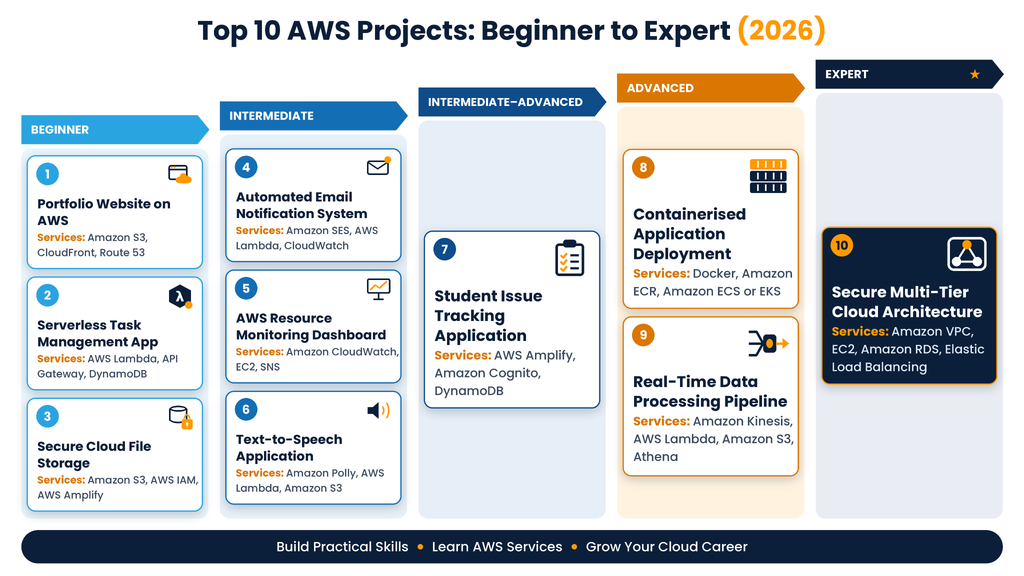
1. Host a Personal Portfolio Website on AWS
Difficulty: Beginner | Project Duration: 3–5 days
Create a personal portfolio website to present your skills, certifications, projects, and contact details. Host it on AWS to understand how websites are made available online. You can begin with a simple design and later add a custom domain and faster content delivery.
Main Features:
- Portfolio Pages: Add sections for your introduction, technical skills, projects, and contact details.
- Website Hosting: Store and serve your website files using Amazon S3.
- Faster Content Delivery: Use Amazon CloudFront to help visitors access website content efficiently.
- Custom Domain: Connect a domain through Amazon Route 53 for a personalised website address.
Tools & Technologies:
- Amazon S3: Stores website files and supports static website hosting.
- Amazon CloudFront: Delivers website content through a distributed network.
- Amazon Route 53: Manages domain name routing.
- HTML and CSS: Control the website structure and appearance.
- JavaScript: Adds interactive features to the website.
Skills You Can Build:
- Cloud Hosting: Learn how websites are hosted on AWS.
- Content Delivery: Understand how a CDN helps deliver website content.
- DNS Basics: Learn how domain names direct visitors to websites.
- Deployment: Practise uploading and updating website files.
- Troubleshooting: Identify common website hosting and configuration issues.
Why build it? A portfolio website gives you a simple project to showcase your AWS knowledge and can also serve as your online professional profile.
2. Serverless Task Management Application
Difficulty: Beginner | Project Duration: 1 week
Create an application that lets users add tasks, update details, and mark work as complete. Use AWS serverless services to process requests and store task information without managing a traditional server. This project introduces the connection between a user interface, backend functions, and a cloud database.
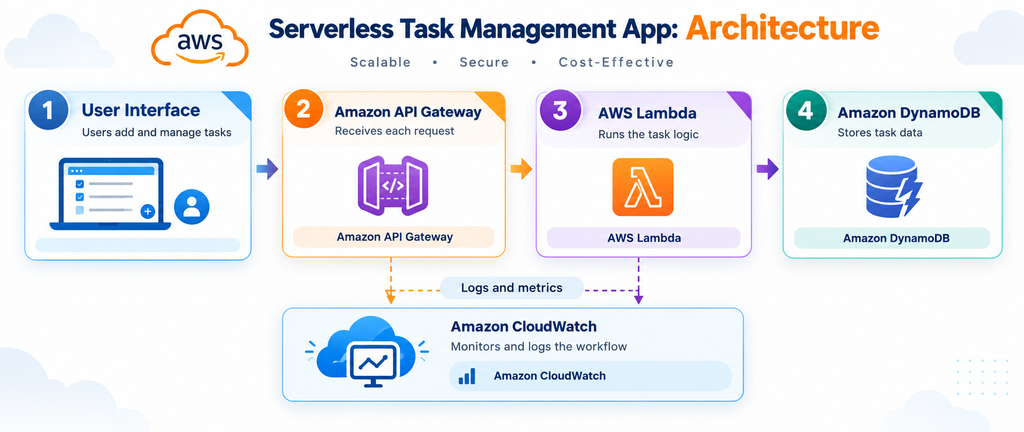
Main Features:
- Add Tasks: Let users enter task names, descriptions, and deadlines.
- Update Tasks: Allow users to edit details and change task status.
- Save Task Data: Store task records so they remain available later.
- Connect Through an API: Send application requests to backend functions.
Tools & Technologies:
- AWS Lambda: Runs backend code without requiring server management.
- Amazon API Gateway: Receives API requests and directs them to backend functions.
- Amazon DynamoDB: Stores task details in a managed NoSQL database.
- JavaScript or Python: Handles application logic and data processing.
- HTML and CSS: Creates the task management interface.
Skills You Can Build:
- Serverless Computing: Understand how applications can run without managing servers.
- API Integration: Learn how frontend and backend components communicate.
- Database Operations: Practise adding, reading, updating, and deleting records.
- Event-Driven Processing: Understand how requests trigger backend functions.
- Debugging: Find issues across the API, application, and database.
Why build it? This project gives you a practical introduction to developing cloud-based applications.
3. Secure Cloud File Storage System
Difficulty: Beginner–Intermediate | Project Duration: 1 week
Develop a web application where users can upload, organise, and access files stored in the cloud. Use Amazon S3 for file storage and configure permissions to protect private information. This project helps you understand why secure access is important when working with cloud data.
Main Features:
- Upload Files: Allow users to upload supported documents and images.
- Organise Files: Group stored files by category or purpose.
- Control Access: Restrict file access to authorised users.
- Download Files: Let users retrieve files they have permission to access.
Tools & Technologies:
- Amazon S3: Stores uploaded files as cloud objects.
- AWS IAM: Manages permissions for AWS services and resources.
- AWS Amplify: Supports web application development and integration.
- JavaScript: Handles file-related actions and application behaviour.
- HTML and CSS: Creates the file upload and management interface.
Skills You Can Build:
- Cloud Storage: Understand how object storage works in AWS.
- Access Management: Apply the principle of least privilege.
- Service Integration: Connect a web interface with AWS services.
- Data Protection: Learn how permissions help protect private files.
- Testing: Check whether users can access only the files they are allowed to see.
Why build it? It demonstrates practical knowledge of cloud storage and basic security controls.
4. Automated Email Notification System
Difficulty: Intermediate | Project Duration: 1 week
Create a system that sends emails when an event occurs, such as a new registration or a completed task. AWS services can handle the notification process automatically, while logs help you understand whether the process worked correctly. You can start with one email type and add more notification rules as your skills improve.
Main Features:
- Event-Based Emails: Send notifications when a supported application event occurs.
- Email Templates: Use consistent formats for different messages.
- Execution Logs: Record activity to help identify errors.
- Automated Workflow: Process notifications without manual intervention.
Tools & Technologies:
- Amazon SES: Sends emails through an AWS-managed service.
- AWS Lambda: Runs the code that prepares and processes notifications.
- Amazon CloudWatch: Stores logs and supports monitoring.
- AWS IAM: Provides the permissions required by the workflow.
- Python: Handles notification logic and error checking.
Skills You Can Build:
- Workflow Automation: Connect events with automatic actions.
- Email Integration: Understand cloud-based email delivery.
- Logging: Review execution records to investigate failures.
- Permission Management: Configure appropriate service access.
- Error Handling: Manage invalid inputs and unsuccessful operations.
Why build it? It introduces automation concepts used in many cloud applications.
5. AWS Resource Monitoring Dashboard
Difficulty: Intermediate | Project Duration: 1–2 weeks
Create a monitoring setup to track selected AWS resources and display useful performance information. For example, monitor an EC2 instance and configure an alert when CPU usage crosses a chosen limit. This project helps you learn how monitoring can support cloud maintenance and problem-solving.
Main Features:
- Metric Tracking: Collect important measurements from selected AWS resources.
- Dashboard Display: Present key metrics in an easy-to-read format.
- Threshold Alerts: Set alerts when a metric passes a defined limit.
- Notifications: Send messages when a configured alert is triggered.
Tools & Technologies:
- Amazon CloudWatch: Collects metrics and logs from AWS resources.
- Amazon EC2: Provides a compute instance to monitor.
- Amazon SNS: Sends notifications to subscribed endpoints.
- AWS IAM: Controls access to monitoring services and resources.
- CloudWatch Alarms: Evaluates metric thresholds and triggers configured actions.
Skills You Can Build:
- Performance Monitoring: Understand resource performance through metrics.
- Alert Configuration: Set suitable limits for important measurements.
- Troubleshooting: Use logs and metrics to investigate issues.
- Resource Management: Observe how resources behave under different workloads.
- Cloud Operations: Learn why regular monitoring matters.
Why build it? Monitoring is a useful skill for cloud support, cloud engineering, and DevOps roles.
A practical learning tip: While working on AWS projects, focus on understanding why each service is used, how the services connect, and how to troubleshoot errors. Project-based learning, such as the practical exercises offered at ProIT Academy, can help learners connect cloud concepts with real technical tasks and prepare to explain their work during interviews.
6. Text-to-Speech Application Using AWS
Difficulty: Intermediate | Project Duration: 1–2 weeks
Develop an application that turns written text into spoken audio. Users can enter a sentence, select an available voice, and generate an audio file. This project helps you understand how AWS AI services can add useful features to an application without requiring you to create a speech model yourself.
Main Features:
- Text Input: Let users enter the text they want to convert.
- Voice Selection: Offer supported voice options.
- Audio Generation: Convert submitted text into speech.
- Audio Storage: Save generated audio files for later access.
Tools & Technologies:
- Amazon Polly: Converts text into spoken audio.
- AWS Lambda: Processes requests and manages the conversion workflow.
- Amazon S3: Stores generated audio files.
- JavaScript: Handles user actions and application requests.
- HTML and CSS: Creates the text entry and audio playback interface.
Skills You Can Build:
- AI Integration: Connect an application to a managed speech service.
- API Usage: Send requests and handle service responses.
- File Management: Store and retrieve audio files.
- Interface Design: Create a clear text-to-speech workflow.
- Error Handling: Manage empty input and failed requests.
Why build it? This project shows how cloud-based AI services can support practical application features.
7. Student Issue Tracking Application
Difficulty: Intermediate–Advanced | Project Duration: 2–3 weeks
Create a portal where students can report problems related to classes, assignments, or technical access. Staff members can review each request, update its status, and provide responses. Include separate permissions for students and staff to make the application more realistic.
Main Features:
- Issue Submission: Allow students to report a problem with its category and details.
- Status Tracking: Show whether an issue is open, in progress, or resolved.
- User Sign-In: Require authentication before users access their account features.
- Staff Dashboard: Let authorised staff review and update submitted issues.
Tools & Technologies:
- AWS Amplify: Supports application development and deployment.
- Amazon Cognito: Manages user authentication.
- AWS AppSync: Provides an API layer for application data.
- Amazon DynamoDB: Stores issue details and status updates.
- AWS Lambda and Amazon S3: Support custom processing and optional file attachments.
Skills You Can Build:
- Authentication: Understand how users sign in to an application.
- Role-Based Access: Separate student and staff permissions.
- API Integration: Connect application screens with stored data.
- Data Modelling: Organise issue records for reliable updates.
- Workflow Design: Create a digital process for handling reported problems.
Why build it? It demonstrates how different AWS services can support a multi-user application.
8. Containerised Application Deployment
Difficulty: Advanced | Project Duration: 2–3 weeks
Package a sample application into a Docker container and run it using AWS container services. Store the container image in a registry, configure the runtime environment, and review application logs after deployment. This project introduces you to container-based deployment practices used in many cloud environments.
Main Features:
- Container Packaging: Bundle application code and dependencies into a Docker image.
- Image Storage: Keep container images in a central registry.
- Cloud Deployment: Run containers using Amazon ECS or Amazon EKS.
- Application Monitoring: Review logs to understand application behaviour.
Tools & Technologies:
- Docker: Packages applications into containers.
- Amazon ECR: Stores container images for deployment.
- Amazon ECS or Amazon EKS: Runs and manages containerised applications.
- Amazon CloudWatch: Supports logging and monitoring.
- AWS IAM: Controls access to deployment resources.
Skills You Can Build:
- Containerisation: Understand containers, images, and dependencies.
- Deployment: Move an application from a local setup to AWS.
- Container Management: Learn the basics of running and updating workloads.
- Monitoring: Review logs to investigate application issues.
- DevOps Fundamentals: Understand how packaging and deployment fit into software delivery.
Why build it? Container deployment is useful for learners interested in cloud infrastructure and DevOps careers.
9. Real-Time Data Processing Pipeline
Difficulty: Advanced | Project Duration: 3–4 weeks
Create a pipeline that collects incoming events, processes the data, and stores the results for analysis. You can use sample website activity or simulated sensor readings as a data source. The project helps you understand how cloud services handle incoming data and prepare it for further analysis.
Main Features:
- Event Collection: Receive records from a data source or event generator.
- Stream Processing: Process incoming records using a serverless function.
- Data Storage: Save processed records for later use.
- Data Analysis: Query stored information to find patterns and summarise results.
Tools & Technologies:
- Amazon Kinesis: Collects and streams event data.
- AWS Lambda: Processes incoming events and transforms records.
- Amazon S3: Stores processed data.
- Amazon Athena: Runs SQL queries on supported data stored in S3.
- Python: Handles data transformation and processing logic.
Skills You Can Build:
- Data Ingestion: Understand how streaming systems receive records.
- Stream Processing: Transform data as events arrive.
- Cloud Storage: Organise data for later analysis.
- SQL Analytics: Query datasets and interpret the results.
- Pipeline Troubleshooting: Investigate missing or incorrectly processed records.
Why build it? It provides a useful introduction to cloud data engineering and analytics.
10. Secure Multi-Tier Cloud Architecture
Difficulty: Expert | Project Duration: 4–6 weeks
Design a cloud environment with separate network, application, and database layers. Deploy a sample application, control communication between components, and monitor the environment. Use infrastructure as code to make the setup repeatable and document why you selected each major component.
Main Features:
- Network Segmentation: Separate public-facing components from private resources.
- Application Hosting: Run the application on suitable compute resources.
- Database Protection: Restrict database connections to authorised components.
- Infrastructure Automation: Define the environment using reusable configuration files.
Tools & Technologies:
- Amazon VPC: Defines the cloud network, subnets, and routing.
- Amazon EC2: Runs the application workload.
- Amazon RDS: Provides a managed relational database.
- Elastic Load Balancing: Distributes incoming application traffic.
- AWS CloudFormation or Terraform: Defines infrastructure through configuration files.
Skills You Can Build:
- Cloud Networking: Understand subnets, routing, and network boundaries.
- Security Design: Restrict access between application components.
- High Availability: Explore load balancing and resilient deployment concepts.
- Infrastructure as Code: Recreate environments from configuration.
- Architecture Documentation: Explain technical decisions and their trade-offs.
Why build it? This project demonstrates your understanding of how a complete cloud environment can be planned, secured, and managed.
Note: Project durations are estimates for a basic working version. Your experience, testing, and additional features may change the timeline. AWS services can incur charges, so review current pricing, set billing alerts, and delete resources when they are no longer needed.
Tips to Make Your AWS Projects More Practical and Industry-Ready
A working project is a good start, but testing, security, and documentation make it more useful as a learning experience. Follow these practices as you complete each project:
- Use Secure Permissions: Give users and services only the access they need.
- Monitor Performance: Use metrics and logs to understand application behaviour.
- Test Different Scenarios: Check successful requests, invalid inputs, and access restrictions.
- Manage Costs: Review service pricing, set billing alerts, and remove unused resources.
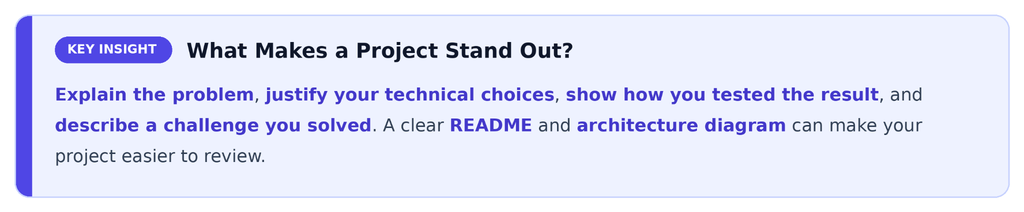
- Document the Project: Include setup instructions, screenshots, an architecture diagram, and key technical decisions.
When comparing IT courses in Pune with Placement, check whether the programme includes hands-on labs, project guidance, resume support, mock interviews, and clear details about placement assistance.

How to Choose the Right AWS Projects for Your Resume
Choose projects based on your current knowledge and the role you want to pursue. A complete project that you can explain clearly is often more useful than several unfinished projects.
| Target Role | Projects to Consider |
| Cloud Support Associate | Portfolio website, resource monitoring dashboard |
| Cloud Engineer | Secure file storage, multi-tier cloud architecture |
| DevOps Engineer | Container deployment, resource monitoring |
| Cloud Developer | Task management application, email notification system |
| Data Engineer | Real-time data processing pipeline |
If you are comparing AWS classes in Pune, look for practical labs, individual project work, and feedback on your code and architecture. Be ready to explain the problem your project solves, why you selected particular AWS services, and how you tested the final result.
For interview preparation, review AWS interview questions and answers and practise connecting the concepts to projects you have completed. This can help you explain your choices with practical examples rather than memorised definitions.
Conclusion
AWS projects can help you progress from basic cloud concepts to practical application development and infrastructure design. Start with a portfolio website, then explore serverless applications, monitoring, containers, data processing, and secure architecture. Focus on testing, security, cost management, and clear documentation throughout the process. A practical AWS course in Pune, combined with consistent project work, can help you strengthen your portfolio and prepare for cloud-related career opportunities.
FAQs
1. Which AWS project is best for beginners?
A personal portfolio website hosted on Amazon S3 is a good starting point. It introduces cloud hosting and deployment without requiring a complex backend.
2. Do I need coding skills to complete AWS projects?
Basic Python or JavaScript can help with application-based projects. You should also learn cloud fundamentals, networking, permissions, and troubleshooting as you progress.
3. How long does an AWS project take?
A basic project may take a few days, while advanced architecture or data pipeline projects can take several weeks. The time depends on your experience and the features you include.
4. Can AWS projects help with job interviews?
Yes. Projects give you examples to discuss, such as service selection, security decisions, testing, and troubleshooting. Make sure you understand each part of the project.
5. How can I find suitable AWS classes near me?
Compare course content, practical labs, project guidance, trainer experience, and interview preparation. Choose AWS classes near me that help you complete projects independently and explain how they work.