Introduction
Managing servers manually can take time and lead to mistakes, especially when businesses run multiple applications. DevOps teams use automation tools to simplify server management, improve consistency, and reduce repetitive work. DevOps classes in Pune can help aspiring IT professionals understand these tools and their role in modern software development. Ansible, Chef, and Puppet are widely used for configuration management and infrastructure automation. Although they solve similar problems, they differ in setup, configuration methods, and learning requirements.
Ansible vs Chef vs Puppet: Which One Is Right for You?
Ansible, Chef, and Puppet help teams automate server configuration and reduce manual work. Understanding these tools through practical exercises and guided projects helps students develop essential DevOps skills and prepare for real-world IT projects.
1. What Is Ansible?
Ansible is an automation tool used to configure servers, install software, and deploy applications. It uses simple YAML files called playbooks to describe the tasks that need to be performed.
Key Features of Ansible:
- Easy-to-Read YAML: Its readable syntax makes basic automation easier to understand.
- Agentless Architecture: Typical Linux automation uses SSH without requiring a permanent agent on each managed server.
- Playbooks: Organise multiple automation tasks into reusable workflows.
- Application Deployment: Automate software installation, updates, and service restarts.
- Multi-Server Management: Run tasks across multiple machines from a central control node.

2. What Is Chef?
Chef is a configuration management tool that uses recipes and cookbooks to define how servers should be configured. It is useful for managing complex environments that require reusable rules and advanced configuration logic.
Key Features of Chef:
Configuration Management: Automate software installation and service configuration.
Recipes: Describe the resources and actions required to configure a server.
Cookbooks: Organise recipes and supporting files into reusable packages.
Ruby-Based Logic: Supports advanced configuration requirements through Ruby-based recipes.
Reusable Configurations: Help teams apply consistent settings across environments.

3. What Is Puppet?
Puppet is a configuration management tool that helps administrators define the desired state of servers and maintain that configuration over time. It is particularly useful for managing consistent settings across large groups of machines.
Key Features of Puppet:
Large-Scale Management: Supports consistent settings across many managed servers.
Desired-State Configuration: Defines how managed systems should be configured.
Manifests: Describe the required system settings using Puppet’s language.
Agent-Server Architecture: Traditional deployments use agents to receive and apply configurations.
Configuration Enforcement: Helps identify and correct supported configuration changes.
Ansible vs Chef vs Puppet: Comparison Table
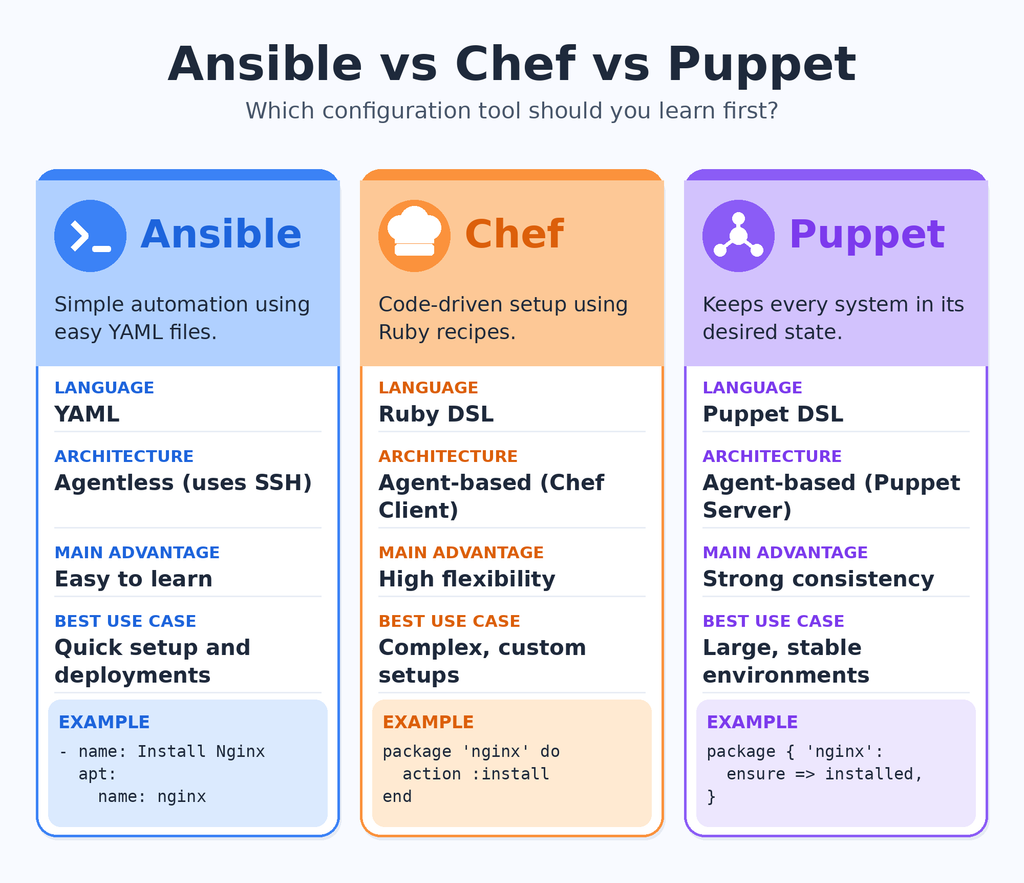
| Feature | Ansible | Chef | Puppet |
| Main purpose | Automation and configuration | Configuration management | Configuration management |
| Language | YAML playbooks | Ruby-based recipes | Puppet DSL |
| Typical architecture | Agentless, push-based | Commonly client-server | Commonly agent-server |
| Learning curve | Generally beginner-friendly | More programming-focused | Requires learning its own language |
| Main strength | Simple task automation | Flexible configuration logic | Desired-state enforcement |
| Best use case | Application deployment | Complex configurations | Ongoing configuration consistency |
Key Differences Between Ansible, Chef, and Puppet You Should Know
Although all three tools support automation, their architecture, configuration methods, and maintenance requirements are different. At ProIT Academy, students can learn these tools and understand how they are used in real-world DevOps projects.
1. Architecture and Setup
Ansible typically connects to managed Linux servers using SSH and executes tasks from a control node.
Chef commonly uses a client-server model in which Chef Infra Client applies configurations defined through recipes and cookbooks.
Puppet traditionally uses an agent-server model to distribute and apply configurations across managed machines.
2. Language and Learning Curve
Ansible uses YAML, which is generally easy for beginners to read and understand.
Chef uses Ruby-based recipes to support flexible configuration logic and complex automation requirements.
Puppet uses its own declarative language, allowing administrators to describe the desired configuration of system resources.
3. Configuration and Maintenance
Ansible is well suited to running deployment tasks and scheduled automation when required.
Chef uses recipes and cookbooks to manage repeatable configurations through its client workflow.
Puppet can repeatedly evaluate managed resources and help correct configuration drift.
Students should also develop skills in Linux administration, Git version control, CI/CD pipelines, and cloud computing. These fundamentals make it easier to understand how configuration management fits into a modern DevOps workflow.

How Ansible, Chef, and Puppet Work in Real-World Projects
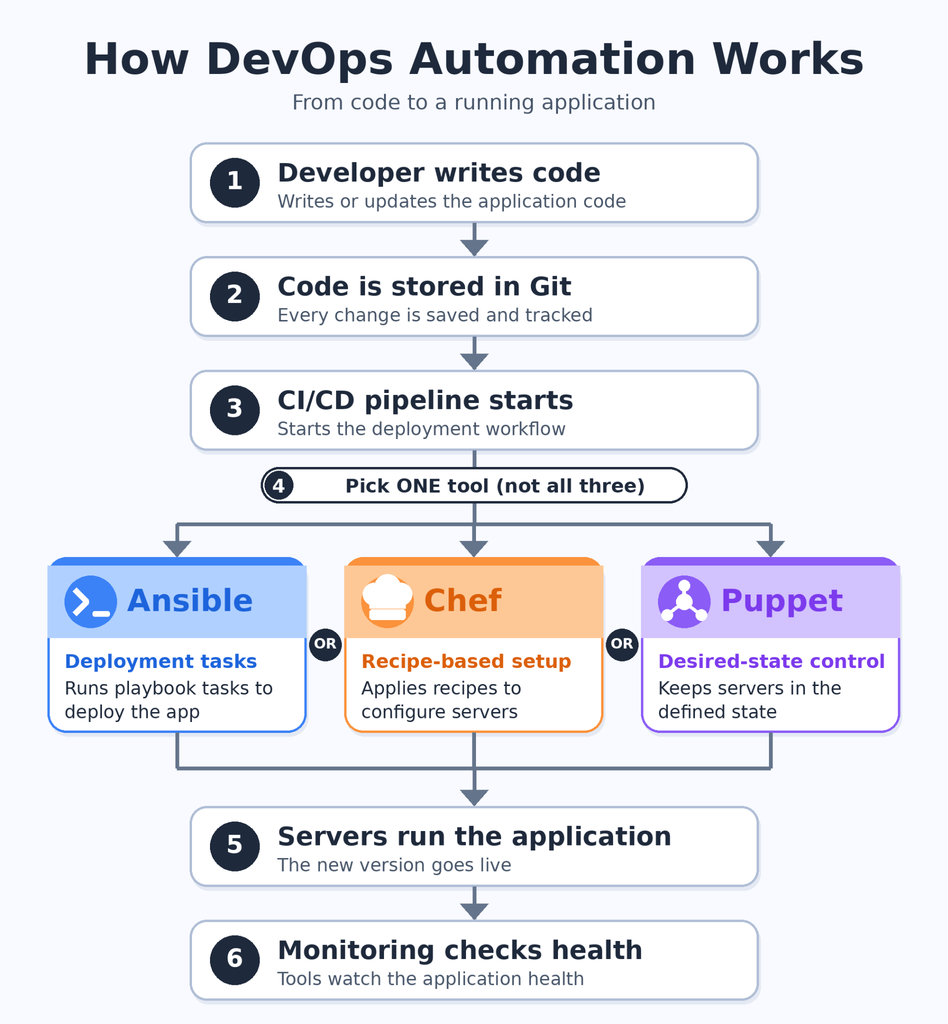
Consider an online shopping company that manages several application servers. The team needs to deploy updates, install software, and maintain consistent server settings. Ansible, Chef, and Puppet can help solve these problems in different ways.
1. How Ansible Works in Real-World Projects
- Automates Application Deployment: Ansible playbooks define the steps needed to release application updates. This helps teams repeat deployments without manually entering the same commands.
- Manages Multiple Servers: One playbook can install packages and update settings across several machines. This reduces repetitive work when managing different environments.
- Simplifies Server Configuration: Ansible can update configuration files, manage services, and restart applications. These tasks help maintain consistent server settings.
- Supports Reusable Automation: Teams can reuse tested playbooks for recurring tasks. This makes routine maintenance easier to manage.
2. How Chef Works in Real-World Projects
- Uses Reusable Recipes: Chef recipes describe the software packages, files, and services required on a server. Cookbooks organise these instructions for reuse.
- Handles Complex Configurations: Ruby-based recipes support advanced logic when different applications need different settings. This helps teams manage complex environments.
- Improves Standardisation: Reusable cookbooks help apply similar configuration rules across development, testing, and production systems.
- Automates Server Setup: Chef can automate dependency installation and service configuration. This reduces the need to configure each server manually.
3. How Puppet Works in Real-World Projects
- Defines the Desired State: Puppet describes how managed servers should be configured. Administrators can define the required software, services, and file settings.
- Helps Correct Configuration Drift: Puppet can identify differences between the desired and actual state of supported resources. It can then help restore the required configuration.
- Maintains Consistency: Traditional agent-server workflows help apply standard configurations across managed machines.
- Supports Enterprise Environments: Puppet can manage recurring configuration requirements across large server fleets, helping teams maintain consistent settings.
Understanding automation tools is an important step in building a DevOps career. Read our guide on The best way to learn DevOps to learn about the essential skills, learning path, and practical steps for beginners.
Pros, Cons, and Best Use Cases of Ansible, Chef, and Puppet
Choosing the right tool depends on the project’s complexity, infrastructure requirements, and the team’s existing skills.
1. Ansible
Pros
- Easy to Learn: YAML playbooks are readable and approachable for beginners. Basic Linux knowledge helps learners understand how tasks are executed.
- Simple Setup: Typical SSH-based Linux automation does not require a permanent agent on each managed server. This can reduce setup and maintenance effort.
- Flexible Automation: Ansible supports deployment, configuration, and routine IT tasks. Playbooks and roles help organise reusable workflows.
Cons
- Complex Playbooks: Large automation projects can become difficult to maintain without clear organisation. Reusable roles and well-structured tasks help reduce this problem.
- Execution Planning: Large environments require careful inventory and concurrency management. Incorrect settings can make automation harder to troubleshoot.
- Recurring Configuration: Ansible does not continuously enforce every configuration by default. Teams must schedule automation or design suitable recurring workflows when ongoing checks are required.
Best Use Cases
- Application Deployment: Automate software releases across multiple servers. This helps teams follow a consistent deployment process.
- Server Setup: Install packages, configure services, and update required files. These tasks are useful when preparing new environments.
- IT Automation: Automate repetitive maintenance activities and service restarts. This saves time and reduces manual effort.
2. Chef
Pros
- Flexible Configuration Logic: Ruby-based recipes support advanced conditions and configuration requirements. This is helpful for applications with complex dependencies.
- Reusable Cookbooks: Cookbooks organise recipes and supporting files for reuse. Teams can apply common configuration standards across environments.
- Repeatable Management: Chef helps define and apply consistent server configurations. This is useful when managing systems with multiple dependencies.
Cons
- Programming Knowledge: Advanced recipes require familiarity with Ruby. Beginners may need additional practice to build complex workflows.
- Operational Overhead: Traditional client-server deployments require additional components and maintenance. Teams must plan for configuration distribution and troubleshooting.
- Testing Requirements: Incorrect configuration code can affect production systems. Recipes should be tested and validated before deployment.
Best Use Cases
- Complex Configuration: Manage servers that require multiple packages and dependencies. Recipes help organise these requirements.
- Reusable Infrastructure Rules: Create cookbooks containing standard configuration instructions. This makes server setup more consistent.
- Enterprise Automation: Automate configuration across environments with different requirements. Flexible logic helps manage complex workflows.
3. Puppet
Pros
- Desired-State Management: Puppet describes how managed systems should be configured. This reduces the need to specify every action manually.
- Configuration Consistency: Puppet can identify and correct supported configuration differences. This helps keep managed settings aligned with defined requirements.
- Large-Scale Management: Puppet supports standardised configuration across many machines. This is valuable for organisations managing large server fleets.
Cons
- Learning Curve: Beginners need time to understand Puppet’s language and resources. Small practice projects can make the concepts easier to learn.
- Setup Requirements: Traditional deployments involve agents and servers. These components require suitable configuration and maintenance.
- Configuration Planning: Large environments need organised manifests and modules. Poor structure can make configurations harder to update.
Best Use Cases
- Enterprise Configuration Management: Maintain consistent settings across large groups of servers. This helps reduce differences between machines.
- Configuration Compliance: Define required software, permissions, and service settings. Puppet can help keep managed resources aligned with those requirements.
- Ongoing Server Maintenance: Repeatedly evaluate supported resources against their desired state. This helps identify and correct configuration drift.
When comparing IT courses in Pune with Placement, review the syllabus, hands-on labs, project quality, instructor support, and placement assistance. Choose a programme that focuses on practical skills and gives clear information about its training and career support.
Conclusion
Ansible, Chef, and Puppet help DevOps teams reduce manual work and manage server configurations more consistently. Ansible is a practical starting point for task automation, Chef supports flexible configuration logic, and Puppet helps maintain the desired state of managed systems.
Students should focus on Linux fundamentals, version control, automation, and hands-on projects before moving to advanced tools. If you are considering a DevOps course in Pune, compare the curriculum, practical training, project opportunities, and support available before enrolling. Building real skills will help you understand how these tools are used in professional environments.
In this blog post, we have compared and contrasted Ansible vs Chef vs Puppet to help you make an informed decision on which tool is the best fit for your organization. Whether you are just starting out or looking to upgrade your current infrastructure automation setup, these three tools are worth considering. To master the skills from industry experts visit ProIT Academy.
Frequently Asked Questions
1. Which is better for beginners: Ansible, Chef, or Puppet?
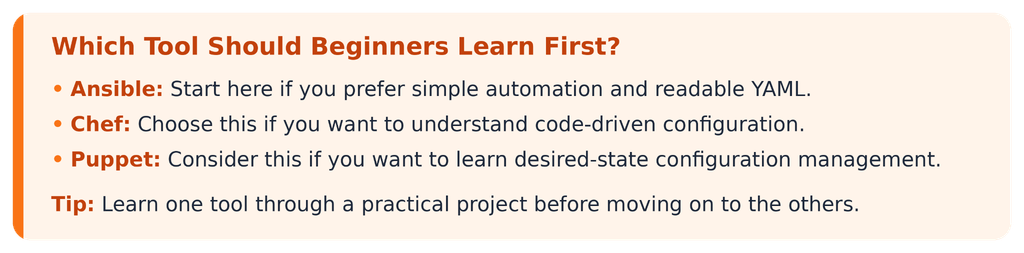
Ansible is generally easier to start with because its YAML playbooks are readable and typical SSH-based Linux automation requires fewer components on managed servers.
2. Are Ansible, Chef, and Puppet used in DevOps?
Yes. They help automate server configuration, reduce repetitive tasks, and support consistent infrastructure management.
3. Do I need coding skills to learn Ansible?
You can start with basic Linux knowledge and YAML. Scripting skills become more useful as you build advanced automation workflows.
4. What should I check before joining a DevOps training programme?
Review the syllabus, practical labs, project quality, instructor experience, and placement support. Choose a programme that gives you opportunities to practise real automation tasks.
5. How can I find DevOps classes near me?
Compare nearby training providers, course modules, practical projects, fees, and reviews. Verify placement claims and choose a programme that fits your learning needs.