Starting a career in cloud computing can feel confusing when you see so many tools and technical terms. But you do not need to learn everything at once. The right AWS tools can help you build websites, store files, manage servers, secure applications, and automate daily tasks. Whether you are a college student, a fresher, or a working professional, understanding these tools is a great first step. A practical AWS course in Pune can also help you turn these concepts into real projects and build skills that employers value.
What AWS Is and Why It Matters for Beginners
Amazon Web Services (AWS) is a cloud computing platform that allows people and businesses to use computing power, storage, databases, and networking over the internet. Instead of buying physical servers, businesses can use AWS resources whenever they need them.
For example, an online shopping website can use AWS to host its application, store product images, manage customer information, and monitor performance. This makes AWS useful for businesses of different sizes.
Here is why AWS is worth learning as a beginner:
- Practical learning: Build and test real applications.
- Career opportunities: Develop skills for cloud support, development, and DevOps roles.
- Flexible resources: Start with a small project and expand as needed.
- Industry knowledge: Understand the technology behind modern websites and applications.
The best way to start is to learn a few core services and practise them regularly instead of trying to understand every AWS service at once.
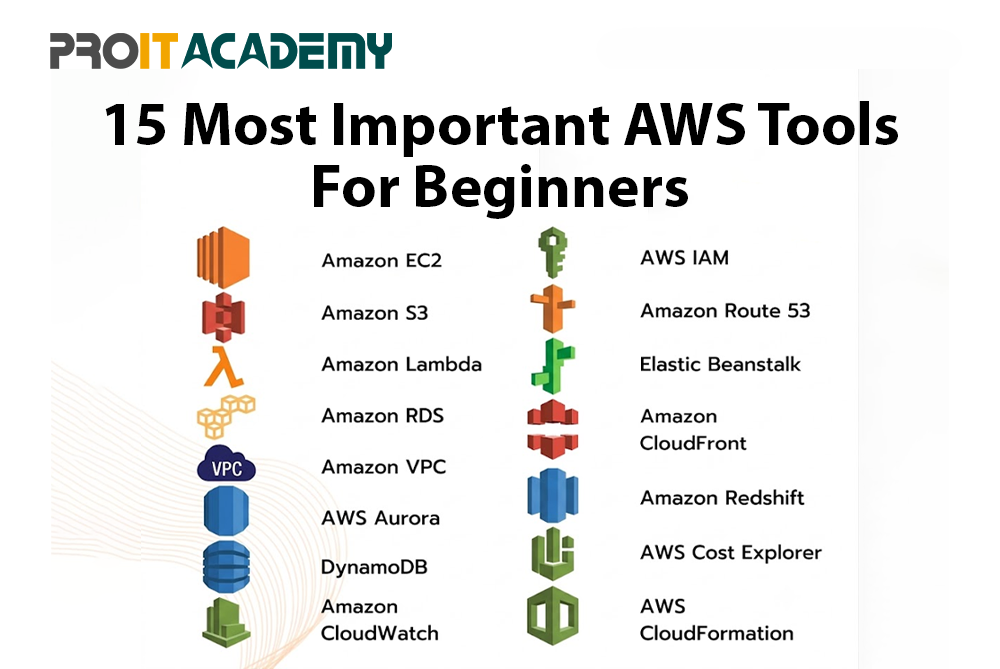
15 Most Important AWS Tools Beginners Should Know
Not every AWS service is equally important when you are starting. Some help you run applications, while others manage storage, security, networking, and automation. Gaining knowledge of these 15 tools will provide you with a strong foundation for cloud computing.

At ProIT Academy, beginners can build their understanding step by step through practical examples and guided learning. The goal is to understand what each service does, why it matters, and how it fits into a real project.
1. Amazon EC2: Cloud-Based Virtual Servers
You can set up virtual servers in the AWS cloud with Amazon Elastic Compute Cloud (EC2). You can choose the operating system, computing capacity, and storage based on your application requirements. Instead of buying a physical server, you can launch an EC2 instance whenever you need computing power. It is one of the most useful starting points for students learning cloud infrastructure.
Key features and uses:
- Launch virtual servers for websites and applications.
- Choose suitable CPU, memory, and storage configurations.
- Configure network access using security groups.
- Scale computing resources according to project needs.
Practical example: Host a basic website on an EC2 instance and learn how a cloud server works. Understanding an EC2 instance is an important first step towards cloud computing.
2. AWS IAM – Identity and Access Management
Who may access your AWS account and what they can do are managed by AWS Identity and Access Management (IAM). By providing each user only the permissions they require, it helps companies in protecting their cloud resources. Beginners should understand IAM before working on projects that involve servers, databases, or storage. Accidental modifications and unauthorized access are less likely when access is managed well.
Key features and uses:
- Create users, groups, and roles.
- Permissions can be assigned by policies.
- The least privilege principle should be applied.
- For better security, use multi-factor authentication (MFA).
Practical example: Give a developer permission to access project files without allowing them to modify unrelated AWS resources.
3. Amazon S3 – Cloud Storage
Amazon Simple Storage Service (S3) is used to store and retrieve files in the cloud. Businesses use it for images, documents, backups, reports, and application data. It is easy for beginners to practise with because you can create a bucket and upload files through the AWS Management Console. Learning S3 also introduces important concepts such as permissions, data protection, and storage costs.
Key features and uses:
- Upload and retrieve files.
- Configure access permissions and encryption.
- Enable versioning to protect against accidental changes.
- Set lifecycle rules to manage stored data.
Practical example: Store profile pictures and uploaded documents for a student registration website.
4. AWS Lambda – Serverless Computing
With AWS Lambda, you can execute code in response to events without having to worry about maintaining the underlying servers. It is useful for tasks that should happen automatically when something changes in an application. For instance, a function to handle a file may be triggered by an upload. Beginners interested in automation and application development can use Lambda to understand event-driven computing.
Key features and uses:
- Run code when supported events occur.
- Integrate with services such as S3.
- Scale automatically based on incoming requests.
- Pay according to eligible requests and execution duration.
Practical example: Automatically resize an image whenever a user uploads it to an S3 bucket.
5. Amazon VPC – Virtual Private Cloud
You can establish a logically isolated network for AWS services using Amazon Virtual Private Cloud (VPC). It assists you in determining which resources are accessible via the internet and how servers communicate with one another. Since secure networking is a key component of cloud architecture, understanding VPC is crucial. Beginners can practise creating subnets and configuring basic network access rules.
Key features and uses:
- Establish private and public subnets.
- Configure route tables.
- Control traffic with security groups and network ACLs.
- Plan secure communication between resources.
Practical example: Put a database in a private subnet and a web server in a public network.
6. Amazon RDS – Managed Databases
You can set up and run supported relational databases with the support of Amazon Relational Database Service (RDS) without having to handle all database administration duties yourself. Database engines like PostgreSQL and MySQL are supported. RDS is useful when applications need structured information that can be stored, updated, and retrieved. Students can use it to understand how web applications connect to databases.
Key features and uses:
- Work with supported relational database engines.
- Configure backup and recovery options.
- Monitor database performance.
- Simplify routine database administration.
Practical example: Store student registration details or customer orders in a database connected to a website.
7. Amazon CloudWatch – Monitoring and Logs
Monitoring AWS resources and apps is made easier with Amazon CloudWatch. It collects metrics and logs that can help you understand application behaviour and investigate problems. Instead of guessing why a website is slow, you can check available monitoring data to identify possible causes. This makes CloudWatch useful for students learning cloud operations and troubleshooting.
Key features and uses:
- Collect metrics and logs.
- Create monitoring dashboards.
- Set alarms for selected conditions.
- Investigate performance issues.
Practical example: Set an alarm to notify you when an EC2 instance crosses a chosen CPU utilisation threshold.
8. AWS CloudFormation – Infrastructure as Code
AWS CloudFormation allows you to define cloud infrastructure using templates. These templates can describe resources such as servers, networks, and storage, making it easier to create similar environments repeatedly. It reduces manual setup and helps teams manage infrastructure changes more consistently. Beginners interested in automation and DevOps should learn the basic concepts of templates and stacks.
Key features and uses:
- Define infrastructure through templates.
- Create related resources as stacks.
- Repeat configurations across environments.
- Track infrastructure changes through version-controlled templates.
Practical example: Create a reusable template for the AWS resources needed by a student project.
9. AWS CLI – Command-Line Interface
By typing instructions into a terminal, you may manage AWS services using the AWS Command Line Interface (CLI).It is useful when you want to perform tasks without opening the AWS Management Console every time. As you gain confidence, you can combine commands with scripts to automate repetitive work. Learning the CLI also prepares you for common cloud administration and DevOps workflows.
Key features and uses:
- Run AWS commands from a terminal.
- List and manage supported resources.
- Automate repetitive tasks using scripts.
- Integrate commands into development workflows.
Practical example: List the S3 buckets in your AWS account using a terminal command.
10. AWS Elastic Beanstalk – Application Deployment
Developers may deploy and manage supported web apps using AWS Elastic Beanstalk without having to manually configure every aspect of the underlying infrastructure. It manages several deployment-related tasks and provides tools to monitor application health. This makes it a helpful choice for beginners who want to focus on application development before exploring more detailed infrastructure management.
Key features and uses:
- Deploy supported application platforms.
- Manage application environments.
- Monitor application health.
- Integrate with other AWS resources.
Practical example: Deploy a simple web application and understand the basic process of cloud application hosting.
11. Amazon CloudFront – Content Delivery Network
Amazon CloudFront helps deliver website content through a global network of edge locations. It can cache supported content closer to users, which may reduce loading times and improve the user experience. It is especially useful for websites that serve images, videos, scripts, and other static files. Beginners can learn how CloudFront works with S3 and application servers.
Key features and uses:
- Cache content closer to users.
- Improve delivery speed for supported content.
- Integrate with S3 and other content origins.
- Support HTTPS and access-control options.
Practical example: Improve the delivery of product images on an online shopping website.
12. Amazon Route 53 – DNS Management
Amazon Route 53 is a DNS service that helps direct domain names to websites and other supported resources. DNS connects a human-readable domain name with the appropriate internet destination. Learning Route 53 helps beginners understand how users reach cloud-hosted websites. It also introduces important concepts such as DNS records, traffic routing, and health checks.
Key features and uses:
- Manage DNS records.
- Route traffic to supported endpoints.
- Configure health checks.
- Connect domain names with cloud-hosted services.
Practical example: Configure DNS records so visitors can access your website using its domain name.
13. Amazon ECR – Container Image Registry
Amazon Elastic Container Registry (ECR) is a managed service for storing and managing container images. These images contain the application and the components needed to run it in a container environment. ECR becomes particularly useful when beginners start learning Docker and cloud-native application development. It also works with AWS container services such as ECS and EKS.
Key features and uses:
- Store container images.
- Manage image versions.
- Configure access permissions.
- Integrate with container deployment services.
Practical example: Store a Docker image before deploying the application through Amazon ECS.
14. Amazon ECS – Container Management
Amazon Elastic Container Service (ECS) helps you deploy and manage containerised applications. Containers help a program function more reliably across environments by packaging it with the necessary components. ECS is useful for learners moving beyond basic server hosting towards modern application deployment. It also introduces concepts such as tasks, services, and scaling.
Key features and uses:
- Run and manage containers.
- Configure tasks and services.
- Integrate with ECR.
- Scale services according to configured requirements.
Practical example: Deploy a containerised web application and manage how it runs in the cloud.
15. AWS CloudTrail – Account Activity Tracking
API events and supported AWS account activity are tracked by AWS CloudTrail. It helps users investigate changes, understand actions performed on cloud resources, and support security reviews. For beginners, CloudTrail provides an introduction to auditing and accountability in cloud environments. It is particularly valuable when learning how to investigate unexpected changes in an AWS account.
Key features and uses:
- Review supported AWS API activity.
- Investigate unexpected resource changes.
- Support security audits.
- Review event details, including recorded timestamps and identities.
Practical example: Check event history to investigate a change made to an AWS resource.
Which AWS Tools Should Beginners Learn First?
| Learning goal | Recommended AWS tools |
| Cloud computing basics | EC2, S3, VPC |
| Security fundamentals | IAM, CloudTrail |
| Application development | Lambda, RDS, Elastic Beanstalk |
| Monitoring and troubleshooting | CloudWatch |
| Automation and DevOps | CLI, CloudFormation, ECR, ECS |
| Website performance and routing | CloudFront, Route 53 |
How AWS Tools Help Beginners Work on Real-World Projects
Reading about AWS services is useful, but practical work helps you understand how they connect. A small project can teach you how applications store data, manage access, handle requests, and monitor performance.
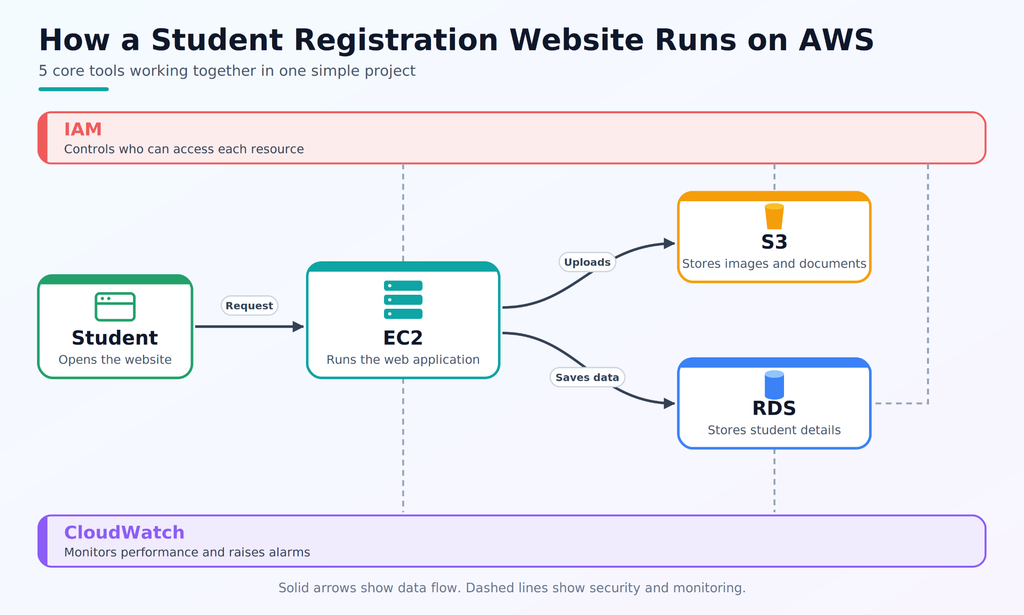
For example, you can build a student registration website and improve it gradually as your skills develop.
- Host a website: Use EC2 to run the application and Route 53 to connect its domain name.
- Store uploaded files: Use S3 for images and documents, with suitable access permissions.
- Manage registration data: Connect the application to RDS to store student details.
- Secure cloud resources: Use IAM permissions and VPC network controls to limit access.
- Monitor application performance: Use CloudWatch to track metrics and investigate errors.
- Automate application tasks: React to events, such the upload of new files, by using Lambda.
- Repeat the setup: Use CloudFormation templates to create project resources consistently.
Start with a basic version of your project, test every service, and record how everything functions. Later, you can add more advanced services as your understanding improves.
Students exploring IT courses in Pune with Placement should look for practical assignments that allow them to build and explain projects like these. When applying for entry-level cloud positions, a project portfolio can help showcase your abilities.
Remember to check AWS pricing, configure budgets or billing alerts where available, and delete unused resources. Some services continue to incur charges while resources remain active.
Career Opportunities After Learning AWS Tools Through an AWS Course in Pune
Knowledge of AWS can help with a variety of IT employment options. Your opportunities will depend on your existing skills, practical experience, project knowledge, and ability to solve technical problems.
A structured AWS course in Pune can help beginners learn cloud fundamentals, practise common services, and prepare for entry-level technical interviews.
| Job role | Skills / tools | Experience level | Expected salary in India |
| Cloud Support Associate | EC2, IAM, VPC, CloudWatch | Entry-level | ₹3–6 LPA |
| Junior Cloud Engineer | EC2, S3, VPC, IAM, RDS | Fresher to 2 years | ₹4–8 LPA |
| AWS Developer | Lambda, S3, RDS, APIs, programming | 1–3 years | ₹5–12 LPA |
| DevOps Engineer | AWS CLI, CloudFormation, ECS, CI/CD | 1–3 years | ₹5–12 LPA |
| Cloud Administrator | IAM, CloudWatch, EC2, CloudTrail | Fresher to 3 years | ₹3.5–9 LPA |
Salary figures are indicative estimates, not guaranteed offers. Actual pay varies by employer, location, technical skills, experience, and interview performance.
Starting your cloud computing journey becomes easier when you learn from practical examples and get the right guidance. ProIT Academy can be an option for students who want to understand AWS tools, practise real-world projects, and build useful technical skills. Before joining, check the course topics and the hands-on training provided.
Choosing the right AWS classes in Pune is an important step towards your cloud career. Look for training that includes practical labs, project work, and AWS certification preparation. With regular practice and a clear understanding of AWS tools, you can build confidence and prepare for new career opportunities.
Conclusion
Learning AWS becomes easier when you focus on the right tools and practise them through real projects. Start with EC2, S3, IAM, and VPC before moving towards Lambda, CloudFormation, monitoring, and container services. These tools can help you understand cloud infrastructure and prepare for different AWS careers. With consistent practice, project experience, and the right guidance, you can build a strong foundation for your cloud computing journey. Choosing suitable AWS classes in Pune can also give you a structured way to improve your skills and prepare for future opportunities.
Frequently Asked Questions
1. Which AWS tools should beginners learn first?
Start with EC2, S3, IAM, and VPC. These services introduce cloud servers, storage, security, and networking before you move to more advanced topics.
2. Can I learn AWS without coding experience?
Yes. You can begin with cloud fundamentals and infrastructure services. Basic programming becomes more useful when learning Lambda, application development, and automation.
3. Is AWS certification enough to get a job?
Certification can support your job application, but it does not guarantee employment. Practical projects, troubleshooting skills, and interview preparation are also important.
4. How do I choose the right AWS classes near me?
When comparing AWS classes near me, check the syllabus, hands-on labs, trainer experience, project work, and placement support. Choose a course that matches your current skills and career goals.
5. How much time does it take to become familiar with AWS tools?
You can understand the basics within a few weeks of regular study. Building confidence with real projects and advanced services takes longer and depends on your practice time.